
Whether you’re tearing down your old smartphone, building a DIY project, or leading a hardware startup, you’ll inevitably come across two terms: PCB and PCBA. And even though they are often used interchangeably, they do not mean the same thing.
This difference and confusion of PCB vs PCBA is important to fix, especially when you’re moving from an idea to an actual product. Why? Because if you order only a PCB when you actually need a PCBA, you’ll end up with a pile of bare boards instead of a working circuit.
In this article, we will tell you all about:
- What is PCB and how it works
- What is PCBA, and why is it the next step
- The types of PCB and PCBA available
- The wide-ranging application of PCB and PCBA in real life
- Why this distinction matters when scaling hardware
- And finally, how Karkhana.io can help you go from idea to production without the usual hiccups
What is PCB?
You can think of a Printed Circuit Board (PCB) as the foundation of any electronic device. It is a skeleton for your gadget, as it does not do anything on its own, but it provides the physical structure and pathways for electricity to flow.
Material: Most PCBs are made of fiberglass, which is quite durable and resistant to heat.
Copper traces: You will find thin conductive lines etched on the surface that act like highways, carrying signals between components.
So yes, without PCBs, we’d still be soldering wires together like it’s the 1950s.
What is PCBA?
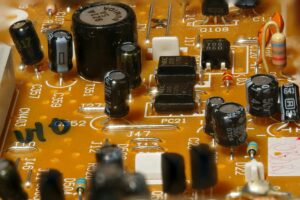
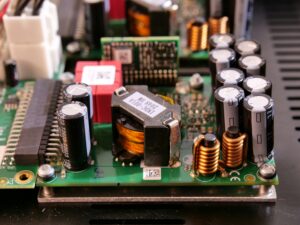
If a PCB is the skeleton, then a Printed Circuit Board Assembly (PCBA) is the living, breathing body. It’s what you get when you take a PCB and populate it with components like resistors, capacitors, diodes, microchips, and connectors.
A PCBA is:
- Functional, as it does something (like process data, control a motor, or run your washing machine’s timer)
- Complex, as it requires precise component placement for it to function correctly.
PCB vs PCBA: The Key Differences
| Feature | PCB | PCBA |
| Definition | Bare board with copper traces, no components | Fully assembled board with components |
| Stage | Foundation stage | Final functional stage |
| Purpose | Provides structure and electrical pathways | Provides actual electronic functionality |
| Complexity | Simpler to manufacture | More complex (assembly + testing) |
| Cost | Lower | Higher (assembly + components + testing) |
| Example | An empty motherboard | A working laptop motherboard |
The Processes Behind PCB and PCBA
Firstly, we are going to start with PCB manufacturing:
- Everything begins with a design. Engineers use CAD tools to map out where the copper traces, pads, and holes will go.
- After this, a DFM check, aka Design for Manufacturability check, will be done at an early stage to catch anything that might cause trouble later.
- Now, once the design is approved, copper sheets are then etched to form the conductive paths. However, if it’s a multilayer board, then these copper layers are laminated together.
- At this stage, holes, which are the vias, are drilled so the electrical connections can flow between layers.
- Last but not least for PC manufacturing, a protective solder mask is applied, after which the silkscreen printing adds labels and markings.
Also Read : PCBs: Exploring the Heart of Electronics
After this, you have a bare PCB; the structure is ready, but it isn’t functional yet.
PCBA Process goes like this:
- The next phase is basically all about the assembly and functioning of it. First, the components like resistors, ICs, capacitors, connectors, etc., are sourced.
- Then, automated machines are used to pick and place the components onto certain spots with precision.
- Now comes reflow soldering, where the board is heated so the solder paste can melt and solidify as it fixes the components in place.
- But what if there are through-hole components? Then they are often inserted by hand or via specialized machines and then soldered.
- Once the board is assembled, it then goes under inspection. This includes optical checks, X-ray (if needed), or visual review—to catch any defects.
- Finally, it’s time for a functional test, which will ensure that the board actually works as intended.
Major Types of PCB and PCBA
One thing to note here is that not all boards are created equal. Which is exactly why choosing the right kind depends on the needs of your product. Here are some types of PCBs that are mostly used:
- Single-Sided PCB
- Double-Sided PCB
- Multilayer PCB
- Rigid PCB
- Flexible PCB
- Rigid-Flex PCB
Application of PCB and PCBA
The application of PCB and PCBA spans almost every sector. Here’s where they show up:
- Consumer Electronics: Smartphones, laptops, TVs, gaming consoles.
- Automotive: EV battery management, infotainment systems, sensors.
- Healthcare: Medical scanners, monitoring devices, portable diagnostic tools.
- Industrial: Robotics, automation, control systems, IoT gateways.
- Aerospace & Defense: Navigation, radar, avionics, missile guidance.
When we talk about the application of PCB, we’re really talking about the backbone of modern life. Without them, none of our devices would function.
Why the PCB vs PCBA Difference Matters
Imagine you’re a startup founder working on an IoT device. You order PCBs, expecting to have working prototypes next month. The shipment arrives, and you’re staring at stacks of bare green boards with no components. Well, guess what? Your launch timeline just got delayed. This is why the PCB vs PCBA distinction matters. Ordering the wrong thing wastes money and time, and also shows how complex scaling hardware is. From sourcing and assembly to testing and quality control, all play a huge role.
How Karkhana.io Can Help You?
At Karkhana.io, we have seen countless teams trip over this very gap and confusion. They knew how to design their product, but weren’t prepared for the leap from PCB to PCBA. We can help you go from PCB design to final PCBA, all under one roof. So whether you are making 5 units ot 50,000, we have got you covered with our team of experts, who are reliable and move fast without compromising on the quality.
The Bottom Line
Let’s wrap this up:
What is PCB? → The bare board with copper traces.
What is PCBA? → The populated, functional board.
PCB vs PCBA → Skeleton vs living system.
Types of PCB → Single, double, multilayer, rigid, flex, rigid-flex.
Application of PCB → Everywhere from consumer gadgets to aerospace.
So yes, understanding the PCB vs PCBA difference is not just about definitions. It’s also about making the right choices in ensign, manufacturing, and scaling. If you are serious about turning your idea into a market-ready product, Karkhana.io is here to help. We will take your first prototype into mass production and ensure your hardware journey is smoother, faster, and future-proof.